

9 USPS Tracking Statuses Explained
- Verified & Reviewed · Last updated July 2026
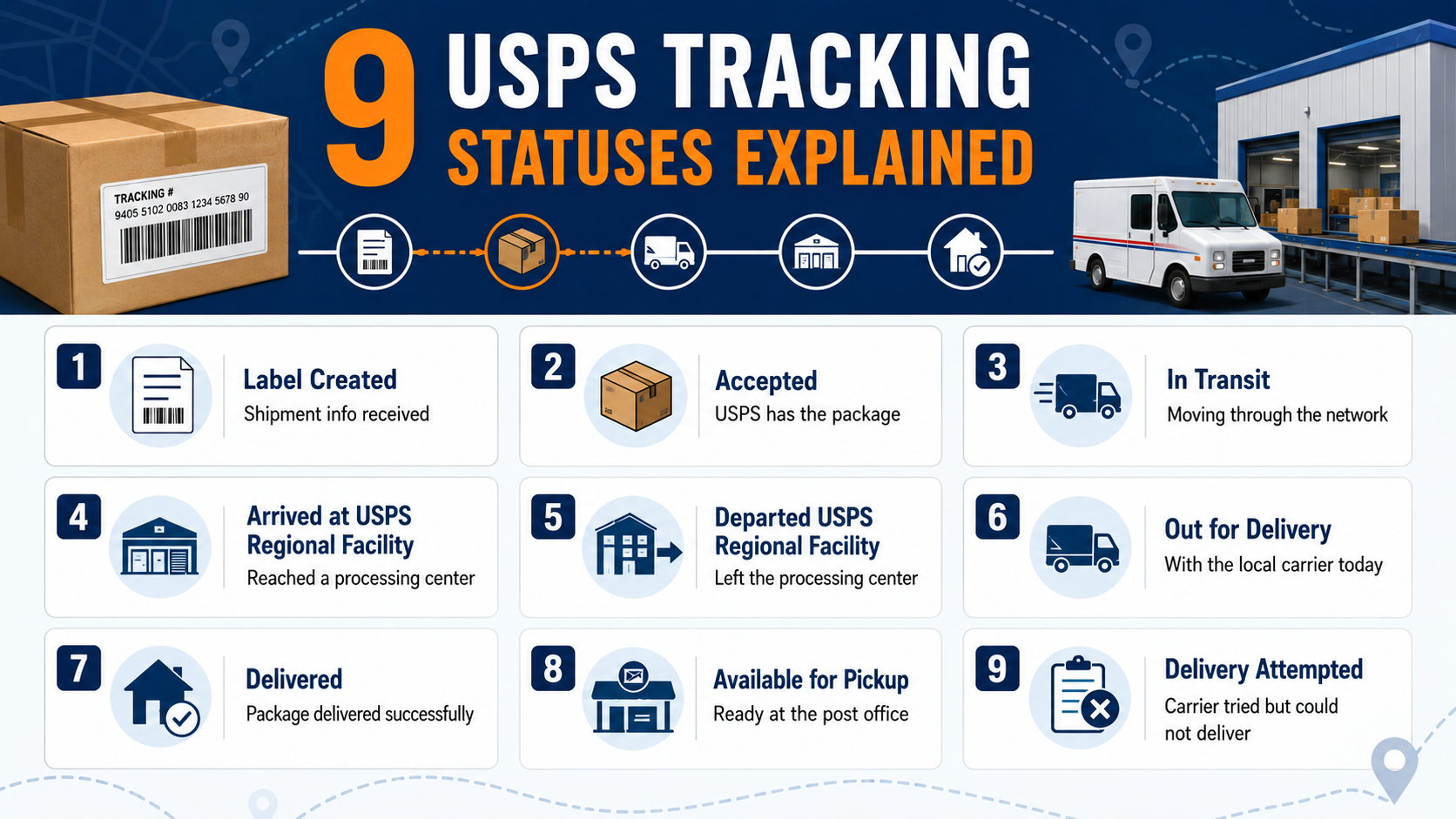
USPS tracking statuses show the latest recorded stage of a package as it moves through the shipping and delivery process.
This 2026 guide explains nine common USPS tracking statuses, including Shipping Label Created, Accepted, In Transit, Out for Delivery, Delivered, Delivery Attempted, Awaiting Delivery Scan, and Return to Sender. It also covers delayed tracking updates and when to contact USPS.
Tracking Statuses
Tracking Update Delays
Missing Mail Search
- Experienced China-based logistics specialists
Table of Contents
What Do USPS Tracking Statuses Mean?
USPS tracking statuses are scan-based updates that describe the latest recorded stage of a shipment. The United States Postal Service scans eligible mailpieces as they enter the system, move between processing facilities, reach the destination area, and complete final delivery.
A USPS tracking status does not provide continuous GPS information. It only reflects the most recent event recorded in the USPS system. A package can therefore continue moving even when the tracking page has not changed.
Although this article focuses on nine primary stages, USPS uses additional sub-statuses for facility arrivals, shipping partner transfers, forwarding, address problems, pickup requests, and redelivery.
A typical USPS package follows this sequence:
Shipping Label Created → Accepted → In Transit → Arrived at Post Office → Out for Delivery → Delivered
The exact sequence may vary according to the mail service, destination, delivery requirements, and whether the package encounters an exception.
How USPS Tracking Works
A tracking number connects a mailpiece to scan events created during the shipping process. Tracking begins when the sender or a shipping partner submits electronic shipment information. It continues when USPS accepts the package and normally ends when the item is delivered, collected, or returned.
The label on a trackable shipment may be scanned several times during its journey. Common scan points include:
The mailing or acceptance location
A USPS origin facility
A USPS regional facility
An intermediate processing center
The destination Post Office
The final delivery location
USPS tracking information can be viewed on the USPS website, through the mobile app, by text message, or through Informed Delivery. The information available depends on the mail class and extra services purchased.
Ordinary First-Class Mail letters, postcards, and flats do not include full package tracking. Services such as Certified Mail or Registered Mail can provide scan information when purchased with an eligible mailpiece.
Each trackable shipment is assigned its own tracking number. That number can normally be found on the mailing receipt, shipping label record, online order page, or shipping confirmation email. Local Post Offices and customer service agents generally cannot recover a lost number, so senders should keep the receipt until delivery is complete.
The 9 USPS Tracking Statuses Explained
Shipping Label Created, USPS Awaiting Item
“Shipping Label Created, USPS Awaiting Item” means the sender has purchased postage and generated a USPS tracking number, but the physical package has not yet been recorded as received by USPS.
The parcel may still be with the seller, waiting for carrier pickup, or moving through a shipping partner network. This is common when an online store sends a shipping confirmation email immediately after printing the label.
Related messages include:
Pre-Shipment Info Sent to USPS
Picked Up by Shipping Partner
Arrived at Shipping Partner Facility
Departed Shipping Partner Facility
On Its Way to USPS
A shipping label created message confirms that electronic shipment information exists. It does not confirm that the package has entered the postal network.
Check the merchant’s stated handling time before taking action. If the status remains unchanged beyond the promised processing period, contact the sender rather than the local Post Office. USPS recommends contacting the shipper when it does not yet have possession of the item.
Accepted or USPS in Possession of Item
“Accepted” means USPS has received or collected the package. The tracking page may also show “USPS in Possession of Item.”
The parcel may have been accepted at a retail counter, collected from the sender, received at a postal facility, or transferred from another carrier. It is now entering USPS mail processing and transportation.
Another related update is “Shipment Received, Package Acceptance Pending.” This means a USPS facility has received a container or pallet containing multiple packages, but individual acceptance scans have not yet been completed.
No immediate action is usually necessary. The next update may show:
Arrived at USPS Origin Facility
Arrived at USPS Regional Facility
Departed USPS Facility
Moving Through Network
USPS confirms that a package marked in its possession has been received or picked up and is being prepared for transportation toward the delivering Post Office.
In Transit to Next Facility
“In Transit to Next Facility” means the package is being processed or transported through the USPS network toward its destination.
It may be traveling by truck or air, waiting for scheduled transportation, or moving between regional sorting centers. The status can appear more than once because a shipment may pass through several facilities.
Common sub-statuses include:
Arrived at USPS Facility
Departed USPS Facility
Arrived at USPS Regional Facility
Moving Through Network
In Transit, Arriving on Time
In Transit, Arriving Late
“Arrived at USPS Facility” confirms that the parcel reached a processing location. “Departed USPS Facility” indicates that it left that location for another stage of transportation.
Repeated facility scans do not necessarily mean that the parcel is moving in the wrong direction. USPS may route packages through different regional facilities according to transportation capacity, destination ZIP Code, and operational conditions.
USPS states that arrived, departed, and in-transit scans may appear multiple times from the same facility or on different days while the package is being processed and transported.
Arrived at Post Office or Arrival at Unit
“Arrived at Post Office” means the package has reached the specific local Post Office responsible for delivery to the recipient’s address.
Some third-party tracking systems use the older description “Arrival at Unit.” Both messages indicate that the shipment is close to final delivery.
This status should not be confused with “Arrived at USPS Facility.” A general USPS facility may be a large regional processing center located far from the destination. The local Post Office is the delivery unit that assigns the package to a carrier route.
The package may be delivered that day or on the next postal business day. If there is no delivery or tracking change after one full postal business day, USPS advises submitting a service request using the tracking number.
Out for Delivery
“Out for Delivery” means the parcel has been prepared at the local Post Office and assigned to a carrier for delivery that day.
The item may not arrive at the same time as ordinary letters. Packages can be delivered by a different carrier or vehicle and may arrive later in the day.
An estimated delivery window may appear on the USPS tracking page, but the window is not a guaranteed appointment. The parcel can still arrive by the end of the day even when the estimated time has passed.
Before the delivery person arrives, make sure:
The mailbox and entrance are not blocked.
Gates and building entrances are accessible.
The house or apartment number is visible.
Pets cannot interfere with the carrier.
An authorized recipient is available when a signature is required.
If the package has not arrived after one full postal business day following the Out for Delivery scan, contact USPS or submit a service request to the local Post Office.
Delivered
“Delivered” indicates that USPS recorded a successful delivery. The tracking information may include the date, time, and type of delivery location.
A package may be marked as delivered:
In or at the mailbox
At the front door or porch
In a parcel locker
At a reception desk
With an individual
With an authorized agent
In another secure location
When USPS tracking says Delivered but the package cannot be found, check more than the front door. Look around the mailbox, garage, side entrance, back door, covered porch, parcel locker, and building management office.
Delivery Attempted or Notice Left
A delivery attempt means the carrier reached the address but could not complete delivery. The correct response depends on the specific message shown in the tracking history.
Common delivery-attempt statuses include:
Notice Left—No Authorized Recipient Available
Notice Left—No Secure Location Available
No Access to Delivery Location
Available for Pickup
Redelivery Scheduled
“No Authorized Recipient Available” usually appears when a signature is required but no eligible person is present. The carrier may leave PS Form 3849 with instructions for pickup or redelivery.
“No Secure Location Available” means the carrier could not find a safe place to leave the package. There may be no automatic second attempt, so the recipient should follow the notice and schedule redelivery or collect the item.
“No Access to Delivery Location” can occur because of a locked building, blocked mailbox, unsafe walkway, loose animal, construction work, or another access problem. USPS normally attempts delivery again on the next business day after access becomes available.
To resolve an unsuccessful delivery, the recipient may be able to:
Schedule redelivery with the tracking number.
Collect the package from the Post Office shown on the notice.
Authorize another eligible person to collect it.
Request return to sender.
Valid photo identification may be required for pickup. Items that remain unclaimed beyond the applicable holding period can be returned to the sender.
Awaiting Delivery Scan
“Awaiting Delivery Scan” or “Delivery Status Not Updated” means USPS did not record a Delivered event by 9 p.m. local time on the day the package was marked Out for Delivery.
This tracking status does not confirm delivery, but it also does not immediately mean that the parcel is lost.
It may appear because:
The carrier did not complete the route.
The package returned to the delivery office.
The final scan was missed.
Scan information has not appeared online yet.
Delivery was postponed until the next business day.
USPS generally anticipates delivery on the next business day. If more than one full postal business day passes without delivery or another update, use the tracking number to submit a service request to the local Post Office.
Return to Sender
“Return to Sender” means USPS cannot complete delivery and is sending the parcel back to the original mailer.
The return may result from:
An insufficient address
A missing apartment or unit number
An incorrect street number
The recipient moving without valid forwarding
The recipient refusing the package
Failure to collect a held package
An address that cannot receive the selected service
USPS may first display a more specific message such as “Insufficient Address” or “No Such Number.” When part of the address is missing or incorrect, the parcel usually cannot be corrected by the recipient while it is in transit.
Contact the sender and confirm the recipient’s full name, street address, unit number, city, state, and ZIP Code. After the sender receives the returned parcel, new postage may be required for reshipment.
An eligible domestic package that has not been delivered or released for final delivery may qualify for USPS Package Intercept. However, interception is not guaranteed and must normally be requested by the sender.
Why Is My USPS Tracking Not Updating?
Seeing the same USPS tracking status for several days does not always mean your package is lost. Because USPS tracking relies on barcode scans instead of real-time GPS tracking, a package may continue moving even when no new update appears.
In many cases, the parcel is traveling between USPS facilities, waiting for transportation, or being processed during periods of heavy mail volume. Understanding the reason behind a delayed update can help you decide whether to keep waiting or contact USPS.
Below are the most common reasons why USPS tracking information stops updating.
The Package Is Moving Between USPS Facilities
When a package travels between major processing centers, it may not receive another scan until it reaches the next USPS facility. Long-distance transportation by truck or aircraft can take one or more days without generating a new tracking event.
During this period, the tracking page may continue showing In Transit to Next Facility or Moving Through Network, even though the shipment is still progressing normally.
You should:
Continue monitoring the tracking page.
Compare the latest scan with the expected delivery date.
Wait at least 24 hours before assuming the package has stopped moving.
A Scan Was Missed During Processing
USPS processes millions of packages every day. Occasionally, a barcode is not scanned when the package arrives or leaves a facility.
A missed scan does not necessarily mean the shipment has disappeared. In many cases, the next available scan appears when the package reaches another USPS facility or the local Post Office.
Signs this may be the cause include:
The package suddenly jumps from one city to another.
Tracking skips several expected updates.
The next scan appears after a day or two with no intermediate events.
High Shipping Volume Is Slowing Processing
Tracking updates often take longer during holidays and other peak shipping seasons. Processing centers handle significantly more packages than usual, creating temporary backlogs.
Although many tracking events appear within several hours, some USPS tracking updates may take up to 24 hours to reflect. During especially busy periods, updates may not appear for 24 to 48 hours.
Common causes include:
Holiday shopping seasons
Promotional sales events
Severe weather affecting transportation
Operational delays at large processing centers
The Package Is Delayed in Transit
Sometimes the tracking page changes to In Transit, Arriving Late. This means USPS expects the shipment to arrive later than the original estimated delivery date.
The package is usually still moving through the USPS network, but transportation or processing has taken longer than expected.
Possible reasons include:
Weather disruptions
Transportation delays
Equipment or staffing issues
Facility congestion
Route adjustments
Many packages with this status are delivered within one to five days, although larger disruptions can result in longer delays.
The Package Is Waiting at the Local Post Office
A package may already be at the destination Post Office without immediately going out for delivery.
This can happen when:
The delivery route has already left
The package arrived late in the day
Delivery is scheduled for the next business day
Additional sorting is required
If the tracking history shows Arrived at Post Office but nothing changes after one postal business day, consider contacting the local Post Office.
There Is a Delivery or Address Issue
Tracking updates may stop after the package reaches the destination area if USPS cannot complete delivery.
Common examples include:
No access to the delivery location
No secure place to leave the package
Signature confirmation required
Incorrect or insufficient address
Recipient requested Hold Mail
These situations usually generate another tracking status, such as Delivery Attempted or Notice Left, after the carrier records the event.
The Package May Be Lost or Damaged
Although uncommon, packages can occasionally be damaged, lose their shipping label, or become separated from the normal mail stream.
If the USPS tracking page has not received a meaningful update for several days after the expected delivery date, it may be time to investigate further.
Consider taking these steps:
Contact the sender if USPS never accepted the package.
Contact USPS customer service if the shipment has entered the USPS network.
Submit a Missing Mail Search if the package meets USPS eligibility requirements.
When to Contact USPS or Start a Missing Mail Search
Most delayed tracking updates resolve without any action. However, once a package has exceeded the normal waiting period for its shipping service, contacting USPS is recommended.
| USPS Service | Consider Contacting USPS After |
|---|---|
| USPS Ground Advantage | About 5 business days after the expected delivery date |
| Priority Mail | About 3 business days after the expected delivery date |
| Priority Mail Express | 1 business day after the guaranteed delivery date |
| International Services | Around 7–10 business days after the expected delivery date |
Before contacting USPS, prepare your tracking number, shipping date, sender information, and the latest tracking history. This information helps customer service locate the shipment more quickly.
Contact the Sender First
Contact the sender when the shipment remains in Pre-Shipment or Shipping Label Created status. Until USPS records possession, the seller or shipping partner is normally responsible for investigating the delay.
Ask the sender to confirm:
Whether the package was physically handed over
The date it was collected or dropped off
Whether a different carrier handled the first stage
Whether the tracking number matches your order
Contact USPS
Contact USPS customer service or submit a service request when the package has entered the USPS network and:
Has passed its expected delivery date
Has stopped receiving meaningful updates
Remains at the destination office without delivery
Shows an unresolved delivery attempt
Was marked Delivered but cannot be found
Has not arrived after an Awaiting Delivery Scan message
Different tracking statuses have different waiting periods. For example, USPS recommends allowing one full postal business day after an Out for Delivery, Arrived at Post Office, Delivered, or Awaiting Delivery Scan event before submitting certain service requests.
Submit a Missing Mail Search Request
A Missing Mail Search is designed for an item that may be delayed or lost after ordinary tracking and customer service steps have not resolved the problem.
USPS allows the request process to begin seven days after the original mailing date.
Before filing a missing mail search request, collect:
The USPS tracking number
The mailing date
The sender and recipient addresses
A description of the packaging
A detailed description of the contents
Photographs when available
Proof of value for an insured shipment
If the package is located and can be forwarded safely, USPS may send it to the address provided in the search request. An insured item may also qualify for a separate claim, depending on the mail service and filing period.
How to Track a USPS Package More Effectively
Enter the complete tracking number on the official USPS tracking page. The latest tracking status, facility history, expected delivery date, and available delivery options should appear when information is available.
You can also receive USPS tracking updates through:
Text notifications
Email notifications
The USPS Mobile app
Informed Delivery
Informed Delivery is a free USPS service that provides eligible users with package status updates and previews of incoming mail. It can also help recipients find the tracking numbers of packages linked to their address.
Keep the mailing receipt or online label record until delivery is complete. Although tracking numbers are unique to trackable shipments, the Postal Service cannot locate an item without the number associated with it.
Avoid entering tracking information through unexpected text-message links. Open the USPS website directly, particularly when a message asks for payment, personal details, or confirmation of a new delivery address.
Frequently Asked Questions
USPS uses many tracking messages. The nine in this guide cover the main stages from label creation to delivery or return.
Most updates appear quickly, but some may take up to 24 hours. During peak periods, delays of 24–48 hours can occur.
No. Most package services include tracking, but standard First-Class Mail letters and postcards usually do not.
The package has reached a USPS processing center and may still pass through other facilities before local delivery.
Usually, yes. It is being processed or transported through the USPS network.
Related Courier & Tracking Guides
Need Help With a USPS Tracking Issue?
- Understand your current tracking status
- Know when to wait or contact USPS
- Find the right next step for delayed or missing packages
Get clear guidance for delayed updates, delivery attempts, missing packages, and Return to Sender statuses.